Building StitchAI: From Prompt to Graph
Building StitchAI: From Prompt to Graph
How I built a Copilot-like experience that turns natural language prompts into node graphs – the data pipeline, request architecture, and reliability engineering behind StitchAI.
What is Stitch?
Stitch is an open-source visual prototyping tool in the spirit of Origami Studio and Quartz Composer. Instead of writing code, designers and developers wire together nodes in a graph to build interactive prototypes.
The vision behind StitchAI: prove that a Copilot-like experience could turn natural language prompts into Stitch graphs. Instead of manually searching for nodes and wiring them together, a user describes what they want and the system generates the graph. This post traces the journey from initial proof-of-concept through building the data pipeline, request architecture, and reliability engineering that made it work.
ctive development on Stitch has since wound down; the code remains open source.
The MVP: Prompt to Graph
The first step was getting anything to work end-to-end:
- User types a prompt
- An LLM responds with structured actions
- Those actions create nodes on the canvas.
I built the initial proof-of-concept across three foundational files: StitchAIConstants (model names, endpoints, feature flags), StitchAIDataModel (the data structures connecting prompts to graph operations), and StitchAIEvents (the Redux-style actions that wire AI responses into Stitch’s state management). The LLMRecordingState struct tracks the full lifecycle – from streaming responses to editing to uploading – using an OrderedSet<Step> for deterministic ordering as steps stream in.
For the user-facing side, I designed StitchAIPromptView for prompt entry and an error modal that surfaces failure details. I set up a dedicated “StitchAI” Xcode scheme with feature flagging so the entire feature stayed invisible in production builds while it matured.
The UX polish mattered early: AI-created nodes are positioned near the insert menu so they appear where the user is already looking, and the layer inspector includes AI-specific rows for reviewing what was generated.
The AI Manager: Actor-Based Request Architecture
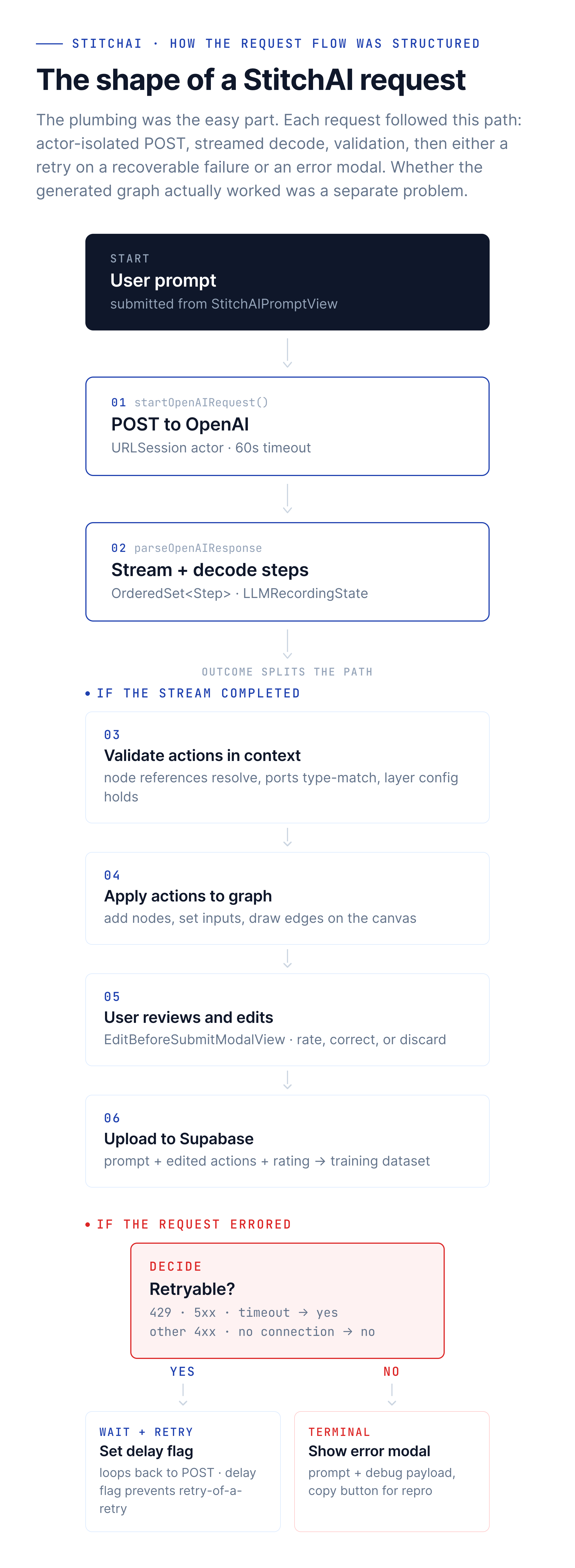
My POC sent requests with ad-hoc Task { try? await … } blocks. As the feature grew, Elliot rebuilt the OpenAI communication path around a StitchAIManager actor that loads secrets from a bundled secrets.json, configures a URLSession (60s request timeout, 120s resource timeout, waitsForConnectivity enabled), and stores the current streaming task for cancellation. The actor pattern keeps all API state – keys, sessions, in-flight tasks – isolated in its own concurrency domain. A single PostgrestClient bridges AI requests and dataset uploads, handling both sending prompts to OpenAI and storing results in Supabase.
Response parsing went through a similar evolution: Chris added structured Codable models of OpenAI’s response format (choices, messages, tool calls, detailed token usage tracking) as part of his smarter validation work; Elliot later added the parsing helper that extracts the content string, decodes it through Stitch’s custom decoder, and returns a strongly-typed result or a descriptive error.
The error modal – which I built early – shows the failure message alongside the user’s original prompt and a Copy button for the debug payload, making it easy to reproduce issues during development.
Schema Design and Structured Outputs
The core challenge: representing graph operations (add a node, connect two nodes, set a value) as structured actions that an LLM can reliably produce. Each action needs to be valid in context – you can’t connect nodes that don’t exist yet, and you can’t change layer types mid-stream.
My POC had loose validation – mostly “does this parse.” Chris later built a much smarter validation layer: action sequences are checked as they arrive (node references must point to previously created nodes, port connections must be type-compatible, layer configurations must be internally consistent), and validation runs after every streamed step, catching invalid actions before they touch the canvas rather than after.
The schema evolved iteratively as the feature grew. Adding Reality layer nodes meant extending the action vocabulary. Adding Model3D layer entries required new port types. Each extension went through the same cycle: define the action, add validation, test with real prompts, adjust.
I maintained LLM_ACTIONS_TO_ADD_LATER.swift as a living roadmap – commented-out action types like LLMMoveNode and LLMAddLayerOutput that are planned but deferred until the schema and model support them. This kept the boundary between “shipped” and “planned” explicit.
Training Data: The Supabase Pipeline
Fine-tuning needs prompt/action pairs from real projects, but early data collection was ad-hoc – screen recordings, emailed JSON blobs, manual transcription. I needed a repeatable pipeline.
I built the SupabaseManager actor: it loads SUPABASE_URL, SUPABASE_ANON_KEY, and SUPABASE_TABLE_NAME from a .env file via SwiftDotenv, then exposes two upload methods. uploadLLMRecording() takes the prompt and action list, JSON-encodes them into a RecordingWrapper, and inserts via PostgREST. uploadEditedLLMRecording() handles the round-trip case where a user has edited the JSON string – it parses the edited text back into structured data before inserting.
For secrets management, Secrets.swift uses an optional initializer that returns nil if secrets.json isn’t in the bundle – no crashes in development, no missing-file fatals in CI. A pre-build script writes secrets.json from environment variables during CI builds.
The key UX piece was the edit-before-submit workflow Chris later built: after an AI request completes, a modal presents the generated actions in an editable list so users can review, correct, and rate the output before it’s uploaded as training data. The intent was to make data collection a side effect of using the feature rather than a separate manual chore. The uploadEditedLLMRecording() round-trip on the Supabase side was mine; the rating-and-review UI was Chris’s.
I also wrote a contributor guide so teammates could record training examples without me walking them through each step.
The Research Pipeline
The iOS app needed an inference path; the training, evaluation, and prompt-engineering work needed Python, fine-tuning APIs, and a different cadence. So a parallel repo grew alongside the main app – separate toolchain, separate iteration speed – to handle everything upstream of the model that actually answered prompts. Roughly 230 commits over nine months, almost all mine.
Dataset extraction and validation. supabase_dataset_downloader.py pulls the prompt/action recordings the iOS app’s Supabase pipeline collected. format.py turns them into JSONL in the shape OpenAI’s fine-tuning API wants. validate_training_data.py rejects malformed examples before they hit a paid training run. Training data was treated the same way you’d treat any other dataset: versioned, validated, with a clear path from raw collection to clean input.
Fine-tuning iterations. Seven supervised fine-tuning versions shipped to the Legacy folder – v0.1.11 through v0.1.17, plus an o4-mini variant – each with its own dataset, system prompt, and train.py configuration. The point of keeping each iteration self-contained wasn’t sentimentality; it was being able to go back and rerun a previous version when a new one didn’t behave like the old one.
System prompts as a versioned artifact. StitchSystemPrompt.txt, AIGraphCreationSystemPrompt_V0, the grader prompts – all lived alongside the code. Each fine-tuning version pinned a specific prompt to a specific dataset. Treating prompts as artifacts (not as configuration) made it possible to A/B them honestly when a new fine-tune underperformed.
Evaluation harness. evaluate_models.py ran candidate models against a held-out set; examine_finetune_job.py inspected training metrics; model_training_info.py tracked the lineage of which dataset produced which model. The ModelTracking.numbers file at the repo root was the lab notebook – which model came from which run, on which dataset, with which prompt.
Reasoner and RFT. The most ambitious push came in June 2025: moving from supervised fine-tuning to reinforcement fine-tuning on a reasoning model, with both Python and model-based graders scoring outputs. “First reasoner fine tuned job that was real” landed on June 14. The graders were iterated heavily – multi-grader scoring, validation thresholds, the boundary between supervised and RFT training data (one commit message: “making sure we do not include jsons with scores < 1 in supervised fine tuning”).
Code-gen and Swift AST extraction. A late-stage experiment: extract_node_definitions.py walks the Swift codebase to produce patch_node_definitions.json and PortValues.json – structured ground truth the model could be conditioned on instead of inferring from examples alone. A companion SwiftASTTest Xcode project explored parsing in the other direction: turning Swift code back into structured actions. The premise was that the gap between “syntactically valid actions” and “semantically useful prototypes” might narrow if the model had a clearer view of the underlying schema.
The Request Layer: Retries, Rate Limits, and Schema Guardrails
The POC had no structured retry logic – requests used ad-hoc Task { try? await … } blocks with duplicate parsing scattered across call sites; failures were silent or confusing. Over the first half of 2025 Chris and Elliot rebuilt that into a real request layer.
Chris added streaming, a rating system, and the typed error hierarchy (StitchAIStepHandlingError, StitchAIStreamingError, StitchAIParsingError), each with a shouldRetryRequest flag so new error cases could plug in without touching the retry loop. He also introduced the retry-sharing flags (canShareAIRetries, currentlyInARetryDelay) that let streamed steps be uploaded to Supabase during the retry delay, opt-in. Elliot then wrapped the whole thing in a centralized startOpenAIRequest function that takes a generic AIRequest, an attempt counter, and the last captured error, and distinguishes retryable failures (HTTP 429, 5xx, NSURLErrorTimedOut) from non-retryable ones (other 4xx, NSURLErrorNotConnectedToInternet, NSURLErrorNetworkConnectionLost). Cancelled requests are detected and treated as non-errors.
The recurring theme across those PRs was that schema enforcement helped more than retry tuning. Preventing bad actions upstream beat recovering from them downstream. I argued against “retry JSON parse” ideas during reviews – a parse failure usually means the schema is wrong, not that trying again will help. But validation only catches what’s structurally wrong; the harder problem – the model producing genuinely useful action sequences in the first place – sat above this layer and wasn’t something the request loop could solve.
Where the Experiment Landed
The infrastructure held up on both sides. On the iOS side, the actor architecture kept concurrency safe and the request layer handled the recoverable failures it was designed for. On the research side, the dataset pipeline, evaluation harness, and seven fine-tuning iterations turned “let’s fine-tune a model” into a repeatable workflow with versioned artifacts.
What didn’t land was the part at the top of the request diagram: getting consistent, useful prototypes out of a prompt. The gap between a model that can produce well-formed structured actions and a model that can produce a sequence of actions a designer would actually want was wider than supervised fine-tuning closed – and wider than the early RFT experiments closed either. The feature stayed behind its flag.
What ports best to my next AI project is the research-pipeline pattern: versioned datasets, versioned prompts, an evaluation harness that can rerun any historical model, an RFT path with custom graders, and code-gen via AST extraction for grounding the model in the actual codebase. Plus, on the product side, the data-collection-as-byproduct pattern – shipping the human review loop alongside the feature so training data accumulates from normal use, and the discipline of treating schema enforcement as a floor rather than a ceiling. The Copilot-shaped goal at the top of the stack is the unresolved part.
Reflections
Human-in-the-Loop Data Collection
Wiring my Supabase pipeline into Chris’s edit-before-submit modal turned data collection from ad-hoc to repeatable. Instead of asking contributors to manually construct training examples, the normal flow of using StitchAI produced reviewed, rated prompt/action pairs. The rating and explanation fields provide signal for which examples are high-quality. The pattern of shipping a review surface alongside an AI feature – so training data is a byproduct of normal use – is the piece I’d reach for first in a future project.
Schema Enforcement Was a Floor, Not a Ceiling
Watching Chris tighten the validation rules – node references must exist, port types must match, layer configs must be internally consistent – I saw whole classes of transport failures disappear that no amount of retry logic could have fixed. But validation only catches what’s structurally wrong. It doesn’t help when the model’s output is structurally correct and semantically off, which turned out to be the more common failure mode.
Feature Flagging for Incubation
The dedicated StitchAI Xcode scheme kept the feature invisible in production while I experimented with it. This meant I could ship experimental builds to testers without affecting the main app, merge AI work into the main branch without feature gates in production code paths, and iterate without risk to the shipping product. The feature stayed behind the flag for its entire lifetime.
This is one of four posts about my work at Stitch. See also: Building a 3D System Inside Stitch, Bringing AR to Stitch, and Computer Vision Nodes in Stitch.