title: "Bringing AR to Stitch: Sessions, Raycasting, Anchors, and Camera Pipelines"
description: "Building augmented reality capabilities for a visual prototyping tool — from AR session management to a multi-platform camera pipeline."
date: "2026-05-25"
Bringing AR to Stitch
Building augmented reality capabilities for a visual prototyping tool – from AR session management to a multi-platform camera pipeline.
What is Stitch?
Stitch is an open-source visual prototyping tool in the spirit of Origami Studio and Quartz Composer. Instead of writing code, designers and developers wire together nodes in a graph to build interactive prototypes. I worked on prototyping and building out the Augmented Reality capabilities — AR session management, surface detection, anchor systems, puppeting, and a camera pipeline that works across iPhone, iPad, and Mac Catalyst.
The goal was to bring Apple’s AR capabilities to Stitch, letting designers prototype AR experiences without writing code or wrestling with complicated platform APIs. Existing deesign tools such as Origami, Figma, etc did not support prototyping with AR, so designers were left to
AR Puppeting
One of the most satisfying demos from this phase was AR puppeting: using device motion and touch to manipulate 3D models in real-time within an AR scene. The recordings below show the progression from basic placement to fluid, gesture-driven manipulation.
The puppeting system combined device orientation data with touch inputs, allowing users to move, rotate, and scale 3D objects by physically moving the device and using multi-touch gestures simultaneously. This felt like the moment AR in Stitch went from “technically possible” to “genuinely useful” – the interaction model was intuitive enough that you could hand someone a device and they’d immediately understand what to do.
Reality View Layer
The RealityNode orchestrates AR sessions within Stitch’s layer hierarchy. I designed the session management logic so that if a parent layer already provides a LayerRealityCameraContent, the node falls back to a GroupLayerNode instead of spawning a duplicate AR session. Otherwise, it creates a StitchRealityContent, wires in the shared CameraFeedManager, and chooses between CameraRealityView (AR camera feed) and NonCameraRealityView based on context.
This conditional logic was essential. Multiple AR sessions competing for the same camera would crash, and Stitch’s layer hierarchy meant a user could easily nest Reality layers without realizing they’d created a conflict. The fallback-to-group behavior made this invisible to graph authors.
Catalyst builds auto-disable camera feeds, while iPad builds can request specific camera directions.
AR Raycasting
I built the AR Raycasting node to enable surface detection – the fundamental interaction for placing virtual objects in the real world. The node wraps Apple’s raycast APIs and converts raycastResult.worldTransform into Stitch’s internal StitchTransform struct.
Each component (position, scale, rotation in radians) is copied explicitly, so graph authors can fan out to animation patches, anchor nodes, or UI overlays without any intermediary math. This ended the “matrix unpack” debugging sessions that previously consumed AR demos. Raycasting output speaks the same language as every other transform in the system.
StitchEntity and AR Anchors
Working with Elliot, I built the StitchEntity system for managing AR anchors. This abstraction layer sits between RealityKit’s raw Entity type and Stitch’s graph, handling the lifecycle of anchored objects – creation, transform updates, and cleanup when exiting AR sessions.
The key challenge was lifecycle management. AR anchors need to be created when entering a session, updated as the device moves, and cleaned up when the session ends or the graph is reconfigured. StitchEntity encapsulates all of this, so graph authors work with a stable abstraction rather than raw RealityKit entities that might appear or disappear depending on session state.
Camera Pipeline: Making It Work Everywhere
One of the less glamorous but most frustrating challenges was getting the camera feed to display correctly across iPhone, iPad, and Mac Catalyst. Each platform reports orientation differently, and the assumptions baked into the iOS pipeline broke in surprising ways on other hardware.
The Problem
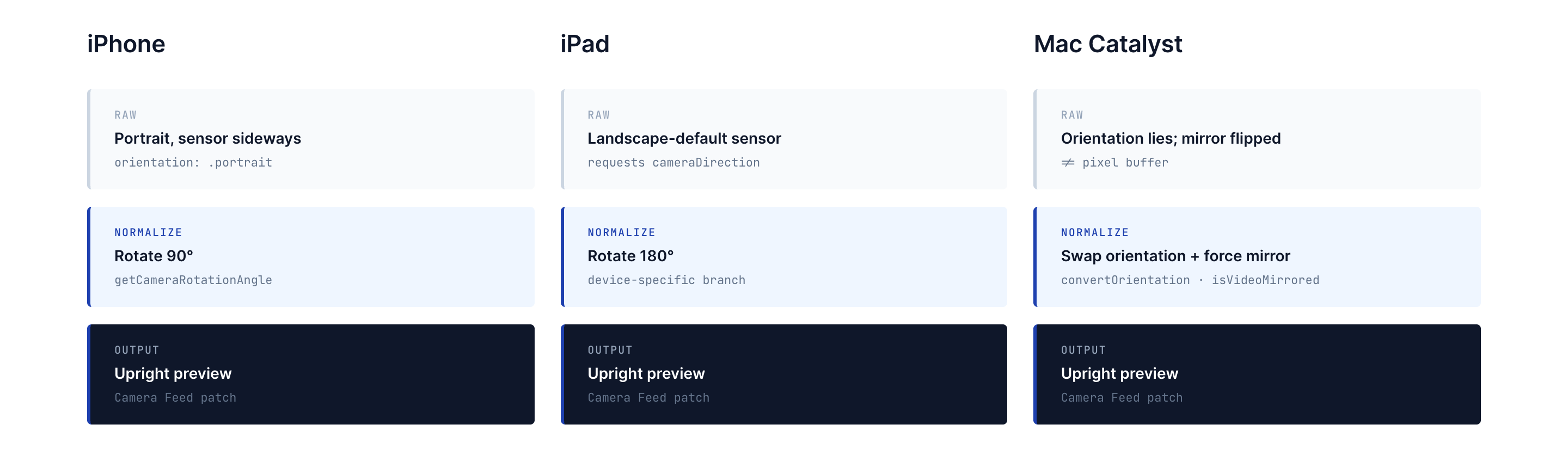
Bringing the app to Mac Catalyst exposed several hidden assumptions in the camera pipeline. The iOS implementation expected ARKit-backed camera data, but Macs often provide basic webcam frames instead. As a result, the feed appeared rotated and mirrored, partly because Catalyst’s reported portrait and landscape orientations did not correspond directly to the actual orientation of the camera pixel buffers.
The Fix: Multi-Layered Orientation Normalization
I discovered the root cause and implemented a multi-layered fix:
convertOrientation and defaultOrientation: I added these to StitchCameraOrientation to swap portrait/landscape cases whenever the code runs on Mac Catalyst and provide a deterministic default for each platform. The conversion happens once at the enum layer, so all downstream code can assume consistent orientation semantics regardless of hardware.
Device-specific rotation: getCameraRotationAngle applies the correct rotation during session setup: iPhone portrait feeds rotate 90 degrees, iPad’s default feed rotates 180 degrees, and Catalyst devices reuse the orientation conversion helper.
Mirroring normalization: Removed the #if !macCatalyst guard and always set connection.isVideoMirrored for front cameras inside CameraFeedActor, giving Catalyst the same mirror-correction that the iOS build relied on.
Session configuration: Marked @MainActor and configured to pass UIDevice.userInterfaceIdiom into CameraFeedActor.configureSession, enabling the device-specific branching that made all of this work.
The result: the same Camera Feed patch now produces upright, correctly mirrored previews across iPhone, iPad, and Mac – critical for testing features like gesture recording and CoreML overlays without reaching for a physical device every time.
XR / Spatial Computing Exploration
The work naturally extended toward Apple’s spatial computing platform. Early visionOS demo tests explored how Stitch’s existing 3D node system could translate to immersive experiences. While this remains exploratory, the foundational architecture – container entities, transform pack/unpack, the StitchEntity abstraction – was designed with platform flexibility in mind.
The fact that so much of the AR infrastructure could be tested against visionOS without major refactoring validated the abstraction decisions made earlier. The StitchEntity layer, the StitchTransform type, and the session management logic all carried forward.
Reflections
Multi-Platform Parity Is Its Own Engineering Discipline
Stitch targets iPhone, iPad, and Mac Catalyst. Each platform reports device orientation differently, handles camera feeds with different assumptions, and has different GPU capabilities. The camera pipeline work was a masterclass in “it works on my device” debugging. The fix wasn’t one clever insight – it was a systematic audit I did of every assumption the pipeline made about its host platform.
AR Session Lifecycle Is Deceptively Complex
Creating an AR session is easy. Managing one within a dynamic node graph – where layers can be added, removed, and rearranged at any time – required careful lifecycle management. The fallback-to-group behavior in the Reality View layer and the cleanup logic in StitchEntity were both responses to edge cases that only surfaced when users did unexpected things with the graph.
Coordinate System Differences Are Everywhere
RealityKit and ARKit worked in 3D world space, Vision worked in normalized image space, and SwiftUI worked in screen-space layout coordinates. Moving data between those systems meant constantly converting between meters, points, pixels, normalized rectangles, and flipped Y axes. Building those conversion layers was a significant portion of the work, and the StitchTransform type became the common language that made cross-framework data flow possible.
This is one of four posts about my work at Stitch. See also: Building a 3D System Inside Stitch, Computer Vision Nodes in Stitch, and Building StitchAI.