Bringing AR to Stitch
Building Augmented Reality capabilities for a visual prototyping tool – from AR session management to a multi-platform camera pipeline.
What is Stitch?
Stitch is an open-source visual prototyping tool in the spirit of Origami Studio and Quartz Composer. Instead of writing code, designers and developers wire together nodes in a graph to build interactive prototypes. Stitch’s nodes come in two kinds: patches, which handle logic and data, and layers, which are the visual elements rendered in the preview window. I worked on prototyping and building out the Augmented Reality capabilities – AR session management, surface detection, anchor systems, puppeting, and a camera pipeline that works across iPhone, iPad, and Mac Catalyst.
The goal was to bring Apple’s AR capabilities to Stitch, letting designers prototype AR experiences without writing code or wrestling with complicated platform APIs. Existing tools such as Origami and Figma didn’t support prototyping with AR, so designers who wanted to explore an AR idea were left writing one-off Xcode projects – exactly the kind of work a prototyping tool is supposed to eliminate.
This was prior to the widespread adoption of tools like Cursor, Claude Code, and Codex that allowed designers to have fluidity with working with code.
AR Puppeting
Before any work began of adding AR features to Stitch’s node graph, I spent time answering a more basic question: could we give an ordinary 3D asset view AR-like behavior by translating the physical movement of the device into movement of the content on screen? We called the idea puppeting. Think of a product page with a 3D sneaker on it – instead of dragging with your finger to orbit the model, you just move your phone, and the sneaker responds as if you were walking around the real thing.
The trick is borrowing ARKit’s world tracking without rendering the asset into the camera feed. The prototype split the screen in two. The top half was an ARSCNView running a world-tracking session, with a gray reference cube anchored to my desk so you could see what the session was tracking against. The bottom half was a plain SceneKit view containing the model. On every frame, the app read the AR camera’s pose (arkitView.pointOfView) and mapped it onto the model node’s transform. The model isn’t “in” the room – but it moves as though you’re physically inspecting it, which is the part of AR that actually matters for this kind of interaction.
The screen recording below catches the prototype mid-iteration: inverting the camera’s transform wholesale (SCNMatrix4Invert), feeding frame.camera.eulerAngles into the model’s rotation, driving the model from a dummy node’s orientation. The goal was to answer the question of which components of the device’s pose, mapped which way, make the on-screen model feel like it’s responding to your movement?
The prototype’s logic then made it into Stitch itself. An AR Session patch – an early node since superseded by the RealityView layer’s built-in session management – exposed the device’s pose as graph outputs: position, roll, pitch, and yaw. Wiring those straight into a 3D Model layer reproduced the puppeting behavio:
The prototype validated the interaction, but it also shaped how AR eventually landed in Stitch. Every hardcoded constant in that view controller was a decision a designer should be able to make by wiring nodes instead of editing Swift. That meant device pose and anchor data needed to flow through the graph as plain transform values – exactly the shape the shipped node set later took. Puppeting in Stitch isn’t a special-purpose node; it’s just wiring pose data into a model’s transform – and the same data could just as easily drive a layer’s opacity, a sound, or a particle effect.
Reality View Layer
The Reality View layer is the piece that makes AR content show up inside Stitch’s preview. The session management logic was designed so it could decide when Stitch needed to start an AR session, connect that session to the shared camera feed, and render RealityKit content into the live view.
The important part was session ownership. Only one AR session can control the camera at a time, but a user could technically add as many Reality View nodes to the graph as they wanted. Reality View needed to handle that gracefully: the first instance could own the AR session, while additional instances reused the existing camera context instead of trying to start another one.
Here’s the first end-to-end run of the Reality View layer – a 3D Model Import patch feeding it, with the toy robot rendering into the live camera feed:
Catalyst builds auto-disable the AR camera feed (Macs don’t have ARKit-backed cameras – more on that in the camera pipeline section below), while iPad builds can request specific camera directions, exposed on the Reality View layer as a Camera Direction input:
AR Raycasting
The AR Raycast patch was built to enable surface detection – the fundamental interaction for placing virtual objects in the real world. The patch wraps Apple’s raycast APIs and converts the raycastResult.worldTransform result into Stitch’s internal StitchTransform struct.
Here it is working: each tap raycasts from the screen into the world, hits a detected surface, and drops a toy robot at the resulting transform.
StitchEntity and AR Anchors
We built the StitchEntity system for managing AR anchors. This abstraction layer sits between RealityKit’s raw Entity type and Stitch’s graph, handling the lifecycle of anchored objects – creation, transform updates, and cleanup when exiting AR sessions.
The key challenge was lifecycle management. AR anchors need to be created when entering a session, updated as the device moves, and cleaned up when the session ends or the graph is reconfigured. StitchEntity encapsulates all of this, so graph authors work with a stable abstraction rather than raw RealityKit entities that might appear or disappear depending on session state.
Camera Pipeline: Making It Work Everywhere
Shipping AR also meant making the camera feed reliable across iPhone, iPad, and Mac Catalyst. From the user’s point of view, the bug was simple: the same Camera Feed patch that looked correct on one device could appear sideways, upside down, or mirrored on another.
Mac Catalyst was the forcing function. Macs do not have ARKit-backed cameras, so Stitch had to handle ordinary webcam frames too. Each platform reported orientation differently, and Catalyst’s reported portrait and landscape orientations did not map cleanly to the actual camera pixel buffers.
The fix was to normalize the feed before Stitch used it. Instead of making every downstream feature handle device quirks itself, the camera pipeline translated platform-specific camera data into one consistent output: upright, correctly mirrored frames that the graph could treat the same way everywhere.
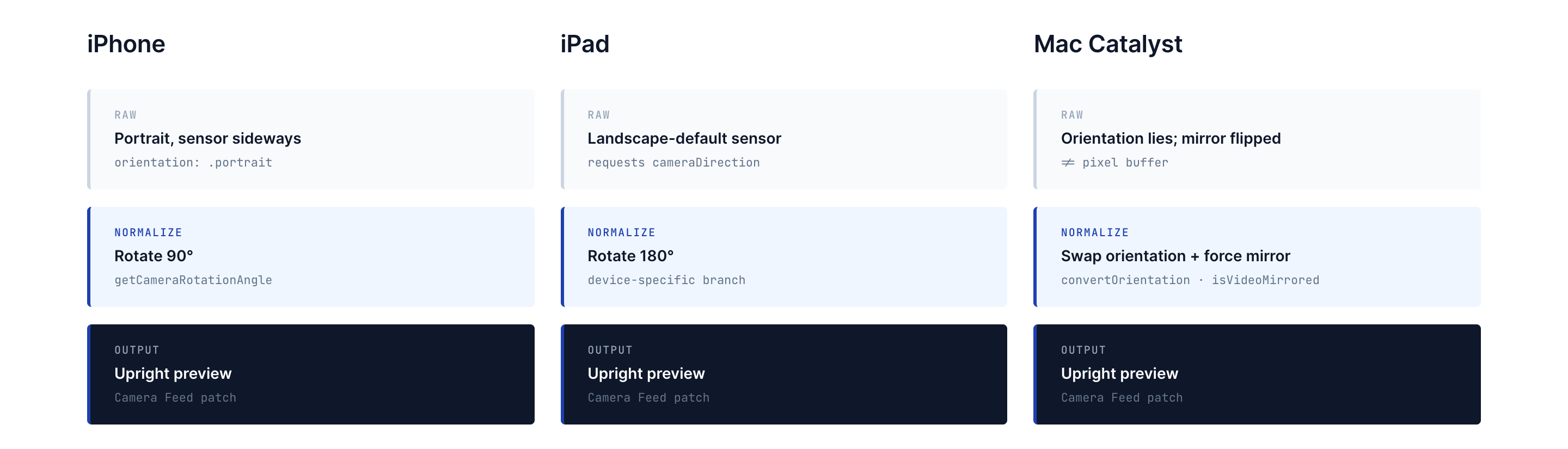
That mattered beyond AR. Once the Camera Feed patch behaved consistently across platforms, features like gesture recording, CoreML overlays, and Catalyst testing could use the same graph logic without special cases.
Here’s the Catalyst feed after the fix – upright and correctly mirrored, matching what the same patch produces on iPhone and iPad:
The Final AR System
Everything above describes pieces I prototyped or built, but the AR system that ultimately shipped in Stitch was very much a team effort – the result of many hands iterating on the node design, the rendering layer, and the underlying RealityKit integration. What follows is a snapshot of where it all landed.
By early 2023, you could assemble a working AR scene entirely in the graph. The workflow: drop in a Camera Feed patch, add a Reality View layer, and the camera feed becomes a surface for 3D content – position, rotation, scale, and anchoring all exposed as ordinary layer inputs.
Composing scenes with multiple models worked the same way as everything else in Stitch: Pack patches build transforms, 3D Model Import patches load assets, and the scene assembles itself in the Reality View’s camera feed. Here’s the toy robot and a drummer sharing a scene, each with independent transforms:
Conclusion
The goal of this work was to make prototyping AR in Stitch feel as direct as working with any other part of the graph. Before that, a designer who wanted to explore an AR interaction usually had to leave their prototyping tool, create a Swift project in Xcode, and deal with ARKit, RealityKit, camera setup, anchors, and transforms by hand.
Our goal, which we accomplished, was that a designer could work with all the AR APIS’s that Apple provided without having to write any code themsleves, or really, understand how all these pieces fit together. Camera frames, device pose, raycast results, anchors, and 3D models could be wired, nested, reused, and combined with the rest of a prototype. AR stopped being a separate engineering project and became another material inside Stitch.
This is one of four posts about my work at Stitch. See also: Building a 3D System Inside Stitch, Computer Vision Nodes in Stitch, and Building StitchAI.